



Why Displays with the Same Resolution Can Still Look Different in Sharpness
When evaluating a display, resolution is often the first specification people notice. It is easy to assume that two screens with the same resolution will deliver the same image clarity. In reality, that is not always the case.
Two displays may both offer the same pixel count, yet one appears noticeably sharper, cleaner, and easier to read than the other. Why does this happen? The answer lies in several factors beyond resolution alone.
1. Screen Size Directly Affects Pixel Density
Resolution only tells us how many pixels a display contains horizontally and vertically. It does not tell us how tightly those pixels are packed. If the same resolution is spread across a larger screen, each pixel becomes larger, which reduces image sharpness.
For example:- A 7-inch display with 1024 × 600 resolution will generally look sharper than
- A 10.1-inch display with the same 1024 × 600 resolution
This is because the smaller screen has a higher pixel density. Text, icons, and fine graphic details appear more refined when more pixels are concentrated into a smaller area.

2. Pixel Structure Also Influences Perceived Clarity
Not all pixels are built the same way.
A display’s perceived sharpness can also depend on its subpixel arrangement and pixel structure. Even if two screens share the same resolution, differences in pixel design may affect edge smoothness, text readability, and image definition.
Factors include:- Pixel shape and aperture ratio
- RGB subpixel arrangement
- Border definition between adjacent pixels
- Driving method and panel design
These structural differences can make one panel look crisper than another, especially when displaying small text or thin lines.
3. Contrast Ratio Has a Major Impact on “Sharpness”
What people often describe as “sharpness” is not always true resolution. In many cases, it is strongly influenced by contrast.
A display with better contrast can make text and graphics appear more defined because the separation between light and dark areas is clearer. By comparison, a lower-contrast display may look softer or slightly blurred, even when the resolution is the same.
This is especially important in industrial and outdoor environments, where ambient light can wash out the image and reduce perceived clarity.
4. Optical Bonding Improves Visual Definition
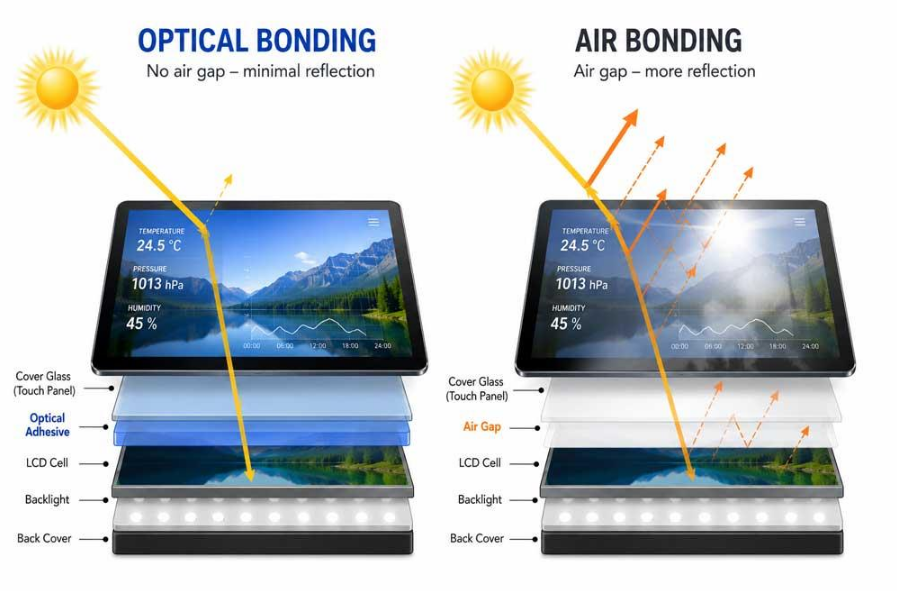
In a standard air-bonded display, the small air gap between the LCD and the cover glass can create internal reflections. These reflections reduce contrast and make the screen look less clear, especially under strong light.
With optical bonding, this air gap is eliminated and replaced by a transparent adhesive layer. The result is:
- Lower internal reflection
- Better contrast
- Improved sunlight readability
- Clearer visual appearance
Even when resolution remains unchanged, an optically bonded display often looks noticeably sharper in real-world use.
5. Surface Treatments Can Affect Visual Perception
For example:
- AG coating reduces glare, but excessive AG can slightly diffuse the image
- AR coating reduces reflections while maintaining image clarity
- AF coating improves touch experience and keeps the screen cleaner
A well-balanced optical design is essential. Otherwise, a screen may lose some visual crispness even though its resolution remains unchanged.
6. Viewing Distance Matters More Than Many People Expect
A lower-PPI display may still appear sufficiently sharp if viewed from a longer distance. On the other hand, a higher-PPI display is more important when the screen is viewed up close, such as in handheld devices, medical interfaces, or compact industrial HMIs.
This is why application context matters. The “best” display is not determined by resolution alone, but by how the screen will actually be used.
7. Display Quality Depends on the Whole Optical System
- Brightness uniformity
- Color reproduction
- Viewing angle performance
- LCD panel type (TN / IPS / VA)
- Backlight quality
- Cover glass thickness
- Touch panel integration
Together, these characteristics determine how sharp and comfortable a display appears in practical use.
Conclusion
Two displays with the same resolution can still look very different because of variations in:
- Screen size and pixel density
- Pixel structure
- Contrast ratio
- Optical bonding
- Surface treatment
- Viewing distance
- Overall optical and mechanical design
For industrial and outdoor applications, selecting a display should never be based on resolution alone. A truly clear and effective display solution must be evaluated from the perspective of the full application environment.
At Leadtek, we focus not only on display specifications, but also on real-world visual performance—helping customers choose the right combination of resolution, brightness, optical treatment, touch integration, and structure for their application needs.


 Microsoft Teams
 WhatsApp
 Email
Email Inquiry
 WeChat
 TOP
TOP